Programming a Raynor garage door opener is simple and ensures smooth operation. Close the door, install the light bulb, activate “Learn” mode, pair the remote, and test functionality. Repeat for additional remotes if needed. For expert help, Hilton Head Garage Doors provides installation, programming, and repair services.
- Start with the garage door closed.
- Install light bulb for utility and pairing signals.
- Locate and press the “Learn” button (quick press, not hold).
- Pair remote within 30 seconds.
- Test opener to confirm functionality.
- Repeat for additional remotes or accessories.
- Hilton Head Garage Doors offers expert support.
When you have purchased and installed a new Raynor garage door, you get more than just a lift mechanism. It also comes with the convenient benefit of being remote controllable. A small garage door opener was likely included in the materials and documentation delivered alongside your door.
However, a remote garage door opener doesn’t work directly out of the box. Instead, it needs to be programmed to match to your door (and your door only).
Why? Because each garage door operates on a semi-unique frequency. This is designed to prevent interference from other wireless devices and from your neighbors’ garage door openers.
With this in mind, here is how to program a Raynor garage door opener in a few simple steps. Follow this guide to get your door opener working perfectly in just a few minutes.
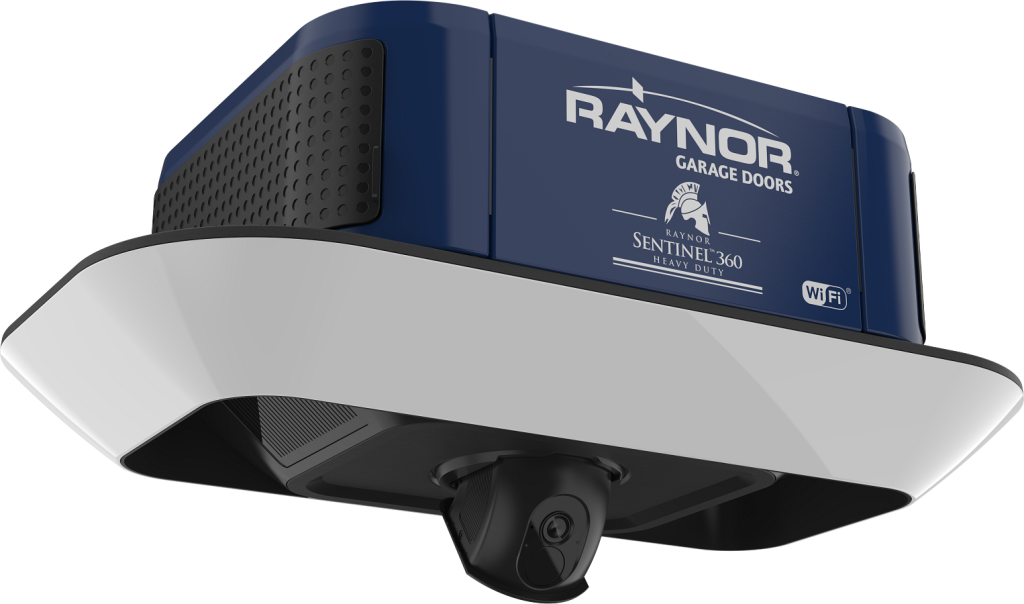
Step 1: Close the Garage Door
Start the process of your Raynor garage door opener programming with the door in the closed position.
Step 2: Install Your Light Bulb
Your Raynor garage door opening mechanism comes equipped with a light bulb socket. This will serve to light your garage when the door is opened or closed. But beyond day-to-day utility, it is also helpful during the Raynor garage door opener programming steps. You’ll see why in a moment.
Step 3: Enable “Learn” Mode
The opener installed in your garage has either a side- or under-panel where all of the wiring connections take place. This spot on the opener is also where the essential “Learn” button is located, which will be used for programming.
First, locate your “Learn” button. Next, press and release the button once. A small orange or yellow LED light next to the “Learn” button should turn on if you have pressed the button properly.
Note: do not hold the “Learn” button down during this step. A simple, quick press is all it takes. Pressing and holding the learn button essentially resets the opener’s memory and clears all of its learned programming.
Step 4: Pair the Garage Door Opener with Your Remote Control
Pairing a garage door opener is a bit of a race at this point. After the “Learn” button has been pressed, you have 30 seconds for the next step.
Simply press and hold the button you wish to program on your remote garage door opener.
Note: this step works for all kinds of garage door remote controls, including the one that came in the box with your lift mechanism. However, pairing the garage door opener to a car controller is no problem as well. Either way, programming the two to communicate with one another is essentially the same process each time.
Once the button and your garage door pair, the light bulb we mentioned earlier will blink or your garage door will click. Once you get a visual response from your garage door, you can be confident that the opener and your button are paired.
Step 5: Test
Once you connect the Raynor garage door opener, it’s imperative to make sure the two are communicating properly.
Test your garage door opener by pressing the button on your remote control. If your garage door opens and closes as expected, you’re all done! If it doesn’t, you may consider going back to step 3 to ensure a proper pairing.
Step 6: Repeat as Necessary
If you have additional accessories for controlling your Raynor garage door opener, it’s no problem. You can simply jump back to step 3 and repeat the process.
Don’t worry, though. This will not clear your pairing with your originally paired controller. Additional accessories will simply be added to the mechanism’s memory.
Get the Garage Door Support You Need
What do you think? We told you it was simple to learn and follow how to program a Raynor garage door opener.
But we know DIY isn’t for everyone. If you ever get lost in the process of optimizing your garage door, support abounds. Raynor has a wealth of information on their support site, including how-to videos. But of course, nothing beats having a trained professional on-site to help you with every step in the installation process.
Hilton Head Garage Doors proudly serves the Lowcountry with trustworthy and reliable expertise with Raynor products. Our teams handle everything from installation to setup and support for your garage door and liftgate needs.
If you need support with your Raynor garage door, we’re here to help. Learn more about our garage door repair services here.